Transferring data has become one of the most time-consuming steps in a photographer’s or videographer’s workflow. After every shoot, files must move from the memory card to the computer, often hundreds of gigabytes at a time. Whether that transfer takes minutes or hours depends entirely on the method used.
In this article, we examine how memory card data transfer works across two methods — wired and wireless — and what each offers in practice. We also discuss how to determine which one best suits your creative process, ranging from fast tethered transfers to fully cable-free setups.
Understanding Memory Card Data Transfer Methods
Today, creators have two main options: wired and wireless data transfer. Wired connections — through card readers, hubs, or cables — remain the backbone of professional workflows, offering maximum speed and reliability. Wireless alternatives promise convenience and mobility, enabling direct transfers to a device without the need for plugging anything in. Understanding where each shines is essential for optimizing your workflow and protecting your data.
Wireless Data Transfer
Wireless data transfer has become increasingly popular among creators who prioritize convenience and mobility. Instead of connecting a card reader or cable, files can be transferred directly from a camera, Wi–Fi–enabled memory card, or wireless adapter to a smartphone, tablet, or computer using Wi-Fi or Bluetooth. Some cameras now feature built-in wireless modules that allow immediate previews or automatic cloud uploads, while standalone adapters and mobile apps extend this functionality to older setups.
Each method caters to a different need. Wi-Fi–enabled cards and cameras are designed for simplicity in the field, allowing quick transfers of selected files. Dedicated wireless adapters prioritize flexibility, enabling the seamless integration of older or specialized equipment into a cable-free workflow.
Advantages of Wireless Solutions
- Cable-Free Convenience:
With no need for physical connections, wireless transfer is ideal for on-location shoots or mobile environments. It lets photographers preview, share, and back up files instantly without needing to unpack extra gear. - Quick Access and Sharing:
Images can be sent directly to clients, mobile devices, or social platforms for immediate review or publication. This is especially useful for event or travel photographers who need to deliver content quickly. - Lightweight Backup Option:
For smaller projects or trips where minimal gear is preferred, wireless transfer offers a simple photo backup solution. It works well for moving JPEGs or short video clips when maximum speed is not a critical factor.
Limitations of Wireless Solutions
- Slower Transfer Speeds:
Even with modern Wi-Fi 6 technology capable of theoretical speeds of up to 1.2 GB/s, real-world performance remains far below that of wired interfaces, such as USB 4.0 or Thunderbolt 4. So, large RAW files or 4K footage will take significantly longer to move. - Connection Stability:
Wireless transfers are susceptible to interference and signal loss due to distance. Connections can drop mid-transfer, requiring restarts or manual verification, which adds uncertainty to time-sensitive workflows. - Security and File Limitations:
Wireless networks are more exposed than physical links, making strong encryption and password protection essential. Some devices also restrict the types or sizes of files that can be transferred, limiting their use for large, uncompressed media.
Wireless Does Not Always Mean Wire-Free(!)
Many wireless systems require additional accessories to reach higher speeds or more stable connections. For instance, the Canon EOS-1D X Mark III features standard 2.4 GHz Wi-Fi for basic connectivity; however, to achieve faster and more reliable performance, an additional wireless file transmitter (WFT-E9A) is required. It extends the range and supports secure SFTP, but it also increases both setup complexity and sets you back more than $700. The same applies to many other professional-level wireless solutions as well.
So, things may initially seem black and white, but they are hardly ever that simple in reality. In other words, going wireless does not automatically mean you will be carrying less gear, nor does it mean it is low-cost.
Wired Data Transfer
Wired data transfer remains the foundation of professional workflows, valued for its speed, stability, and reliability. By connecting a memory card directly through a card reader, hub, or cable, data moves with minimal interference and maximum consistency. This direct physical connection ensures that every bit of information reaches its destination securely. It’s a critical factor when working with large, high-value projects.
Advantages of Wired Solutions
- Maximum Speed:
Modern interfaces such as USB 4.0 and Thunderbolt 4 reach speeds of 5GB/s, far surpassing even the fastest wireless connections. This allows creators to move hundreds of gigabytes of data in minutes, not hours. - Stable and Predictable Performance:
Wired connections eliminate the risk of interference, signal drops, or fluctuating speeds. Once a transfer begins, it runs at a consistent pace from start to finish, which is essential when handling large RAW files or 8K video. - Enhanced Security:
Because wired transfers occur within a closed physical connection, data remains protected from external network threats. This makes them the preferred option for professionals working with sensitive or commercial material.
Limitations of Wired Solutions
- Physical Setup:
Wired transfers require access to a reader, compatible ports, and cables. For mobile creators, that can mean carrying additional accessories and finding a workspace for setup. - Cable Management:
Compared to direct in-camera or wireless transfers, wired setups require a bit more organization. Each connection: card, computer, reader, and drive adds a link to manage, making a clear system essential for smooth operation. Also, in professional environments with multiple devices connected simultaneously, tidy cable routing is critical for maintaining order and preventing accidental disconnections.
Not All Wired Setups Are Created Equal(!)
Just as with wireless setups, not all wired transfers are created equal. While the term often brings to mind a simple USB cable connecting the camera to the computer, that setup only represents the most basic level of performance.
For professional workflows that handle high-resolution video or thousands of image files, the quality of the connection — and the hardware managing it — plays a significant role in how quickly and reliably data is transferred.
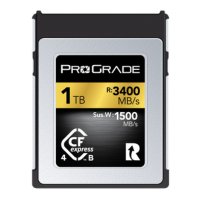
A memory card can only perform as well as the reader and interface allow it to. A CFexpress Type B memory card, capable of handling read speeds of up to 3,550MB/s, cannot reach those data rates through a consumer-grade reader utilizing a USB 3.1 Gen 1 cable, which tops out at around 625MB/s. In that case, you will be realizing only around 20% of the card’s actual performance potential. To fully unlock that speed, the entire chain – card, reader, cable, and computer port needs to support the same high-speed standard.
Professional-grade readers, on the other hand, are designed to provide enough headroom and maintain the card’s full potential. They deliver sustained throughput and protect data against transfer errors. All critical factors in professional post-production environments.
To sum up, not all wired methods will automatically outperform wireless in speed and reliability; the difference between a standard cable provided by a device manufacturer and a purpose-built workflow reader is often the difference between waiting and working. For creators managing large media libraries or working under strict deadlines, a film-industry-grade reader or workflow hub, paired with certified high-performance cables, is what transforms a wired connection into a true professional workflow.
Comparative Analysis: Wired vs. Wireless
To put things into perspective, the image below illustrates the difference in data transfer speeds between consumer-grade and professional-grade solutions — both wired and wireless. There are countless configurations available today, from varying cable standards to advanced transmitters and adapters. The examples shown here represent common wireless solutions built around widely available Wi-Fi 5 and 6E technology, compared against consumer-grade readers using USB 3.1 cables and professional workflow readers with advanced chipsets utilizing USB 4.0 cables, to show how much transfer speed can vary across different setups.
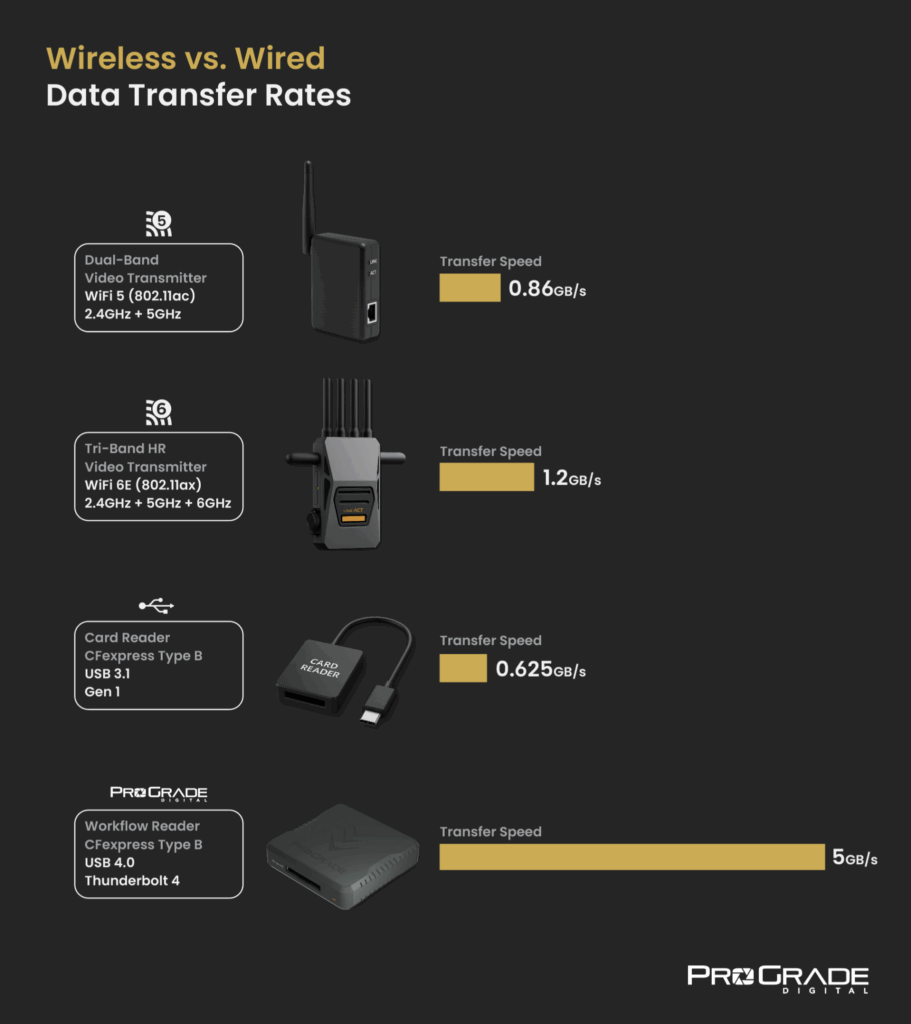
Please note that the image above depicts theoretical peak speeds for Wi-Fi transmitters. Real-life performance varies greatly. Even with optimal conditions, the actual throughput of Wi-Fi transmitters is often below or around 50% of the advertised data rate (roughly 400-600MB/s for Wi-Fi 6E and 280-430MB/s for Wi-Fi 5 devices) due to factors such as signal interference, distance, and network congestion.
Unlike wireless systems, card readers operate through a controlled physical connection. That said, real transfer rates may still differ from theoretical maximums. However, when cheap consumer-grade readers are often plagued by low-quality components (i.e., unstable controllers, unreliable chipsets) and tend to experience a noticeable performance drop, then high-efficiency professional-grade readers are usually only limited by external factors such as protocol overhead, file system inefficiency, or host-side bottlenecks (e.g., SSD write speeds, CPU load) and hence uphold data rates that are much nearer to their listed maximum speeds.
Wired vs. Wireless: Choosing the Right Transfer Method for Your Workflow
The best transfer method is the one that fits how you work. Photographers and videographers approach projects in very different ways; from hobbyists sharing images on the go to production crews handling terabytes of footage each day. How and where you move your data often matters more than the tools themselves.
When to Go Wireless
Wireless systems suit creators who value freedom over raw speed. If your workflow involves quick sharing, collaboration, or reviewing work in the field, wireless connectivity can feel almost seamless. Many modern cameras and adapters enable images to be transferred directly to a phone, tablet, or cloud folder without requiring a single cable to be unpacked.
For hobbyists, travel photographers, or content creators producing small batches of images, this flexibility sometimes outweighs the slower transfer speeds. Even in professional environments, there are situations where wireless shines. For example, when a producer or DOP needs to monitor shots in real-time, or when you are part of a news team that sends images directly from the location to the newsroom. In these cases, the ability to move files instantly justifies the higher setup cost and complexity.
When to Go Wired
Wired systems, on the other hand, remain the most efficient choice for structured, data-heavy workflows. If your day ends with multiple full memory cards or large video sequences that require immediate backup and preparation for post-production, or you need to archive large volumes of media files once the creative process is over, the speed and reliability of a wired connection simply keep the process moving.
Readers designed for professional workflows not only ensure files are safely offloaded and transferred quickly, but also allow simultaneous transfers from multiple cards (even with different types and form factors). If you shoot to CFexpress Type A and SD cards, there is a dual-slot reader for that. Similarly, if you shoot to CFexpress Type B or CFast and SD cards, there are dual-slot solutions for that. Additionally, professional-grade wired setups are available for a fraction of the cost of reliable wireless solutions, all while offering higher transfer speeds.
Many professional filmmakers and photographers pair wired setups with organized post-production systems — direct import to editing drives, automatic backups, or verification tools — all of which depend on consistent data throughput. For these workflows, a professional-grade wired setup offers the speed and stability needed to keep projects on schedule.
Matching Technology to Your Creative Pace
Ultimately, both systems serve different work rhythms. Wireless favors spontaneity, mobility, and instant access. Wired supports structure, precision, and continuous high-speed throughput. Some creators eventually find their balance between the two. One method for the moments that call for immediacy, and the other for everything that follows.
The right choice isn’t about the technology itself, but how well it matches the way you create.
How to Build a Reliable Wired Data Transfer Setup
If your workflow demands consistent speed and you have decided on a wired data transfer setup or a dual-system setup that combines wireless flexibility with wired efficiency, the following three guidelines will help you build a steadfast wired data transfer solution:
1. Avoid Direct Camera Connection
The simplest method is connecting the camera to the computer using a standard USB cable. It works for quick imports or when only a few files are needed, but the camera’s internal controller and port speed limit performance. Even with USB 4.0, transfer rates are limited by the camera’s internal controller and port speed, often falling well below what the memory card itself can deliver. For large projects, this method is slow, inefficient, and prone to interruption.
More importantly, it ties up your camera for the entire transfer, preventing you from shooting or preparing for the next setup. Using a high-end camera to transfer your files is one of the least efficient choices you can make on set. It puts unnecessary wear on the camera, wastes valuable production time, and quite literally turns your most expensive piece of equipment into a slow external card reader.
2. Steer Clear of Consumer-Grade Card Readers and Cables
Basic card readers or cheap cables may seem like a cost-saving choice upfront, but that saving is often an illusion. Slower transfer speeds, unstable connections, and weaker components not only eat up valuable time but can also lead to corrupted files or interrupted transfers, resulting in far more significant losses in terms of time and data risk than a reader built to the same reliability standards demanded on commercial film sets would ever incur.
Many low-cost readers also rely on outdated chipsets that throttle performance once the transfer load increases, turning what should take minutes into hours. In professional workflows where every minute counts, reliability is not a luxury; it is part of the cost of doing the job right.
3. Use Professional-Grade Workflow Readers and Hubs
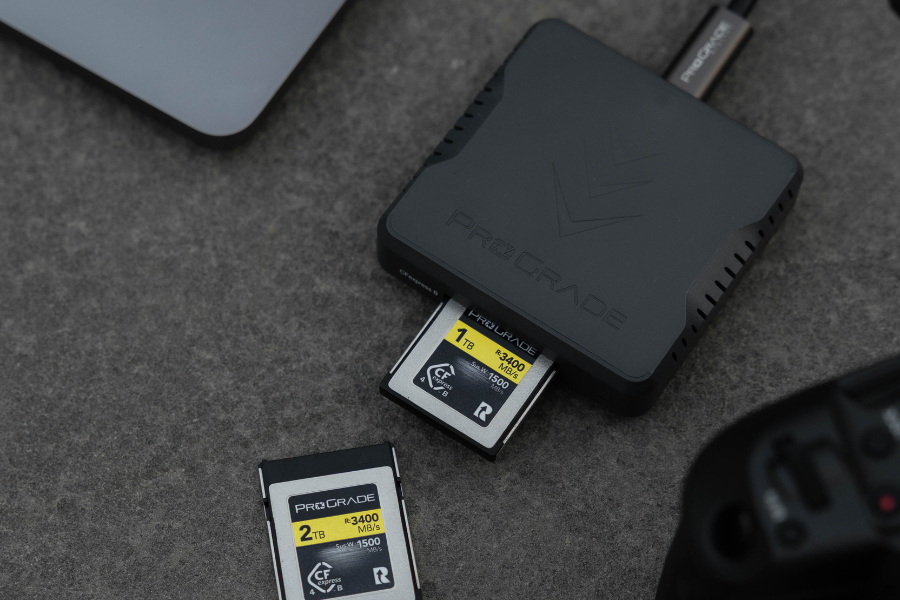
Dedicated memory card readers — such as ProGrade Digital workflow readers — are built specifically for sustained, high-volume data transfer. Using optimized controllers and high-quality internal components, they maintain stable performance throughout long transfers, ensuring data integrity even with massive file sizes. Dual-slot and modular readers further enhance efficiency by allowing simultaneous offloads from multiple cards, while integrated hubs simplify workstation setups with fewer cables and cleaner power management.
Build Your Wired Setup: Browse ProGrade Digital Workflow Readers & Certified Data Cables and Workflow Hubs
Final Words: Wired vs. Wireless Data Transfer Solutions
In the end, every workflow comes down to efficiency and consistency. The faster and more reliable your files move, the smoother the entire process becomes. Whether your workflow requires you to go wireless for flexibility or wired for speed and reliability, the right setup should serve how you create. And not interrupt it. We hope this article helps you build a data transfer system that fits the way you work and keeps your focus where it belongs: on creating